Bassam Kamal
What it does Screens Privacy policy Support
SipStudio app icon
iPhone companion for the QuadStick

Set up your QuadStick from your phone.

Called SipStudio inside the app. Listed on the App Store as Quadstick: Mobile Helper.

See what every sip, puff and switch does, change it, check it, and install it over USB-C. No spreadsheet required.

Coming soon to the App Store GitHub

Free to edit, check and install. No account.
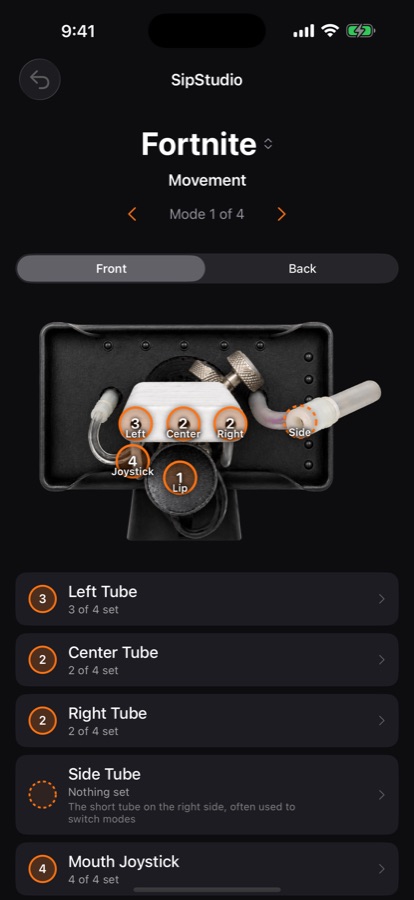
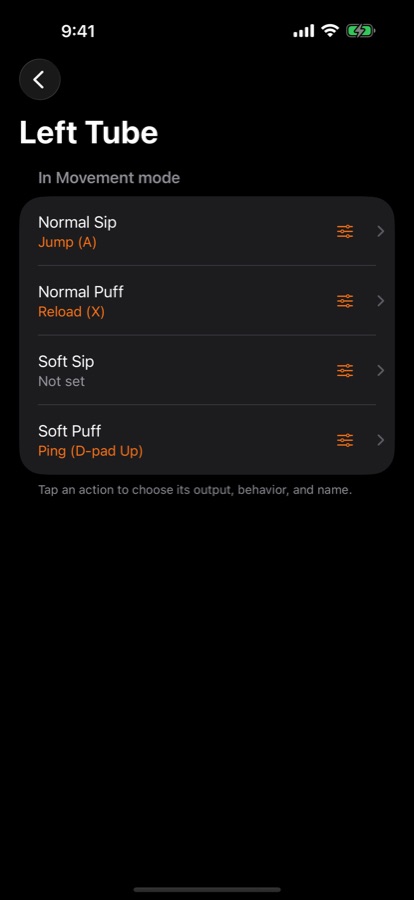
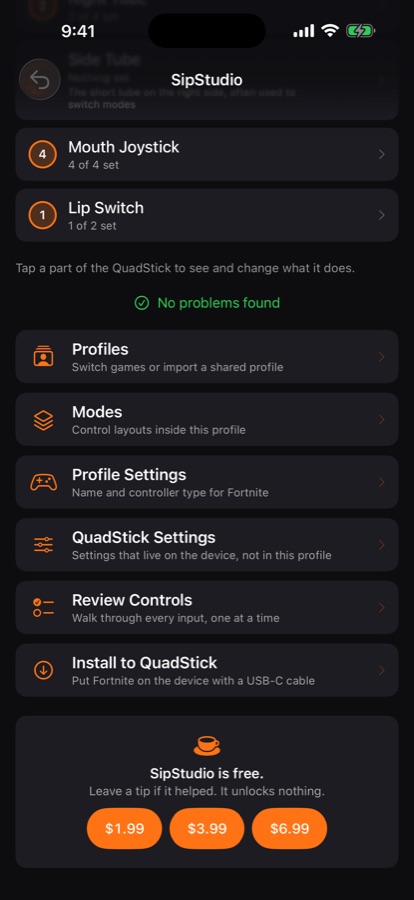
A QuadStick profile with the device photo and tappable tubes, joystick and lip switch Left Tube detail screen showing normal sip, normal puff, soft sip and soft puff assignments Profile home screen with no problems found, a list of actions, and the tip jar
01

See what every part does

Tap a tube, the lip switch or the joystick on a photo of the QuadStick and see what it does in the current mode. Pick which QuadStick model you own and the app shows that model.

02

Change it

Assign a controller button to a sip, puff, long sip, long puff or soft lip. Add, rename, reorder and delete modes. Undo any change.

03

Catch mistakes, then install

SipStudio checks the profile as you edit and lists any problem in plain words, with how to fix it, before it reaches the device. Then save the profile to the QuadStick over a USB-C cable using the Files app.

What is inside

Every profile, every mode, on your phone.

A QuadStick keeps its setup in profiles, one per game or activity, and each profile holds several modes. SipStudio lets you, or whoever helps you set it up, read and change all of it without a spreadsheet.

See what every part does

Tap a tube, the lip switch or the joystick on a photo of the QuadStick and see what it does in the current mode. Pick which QuadStick you own and the app shows that model.

Change it

Assign a controller button to a sip, puff, long sip, long puff or soft lip. Add, rename, reorder and delete modes. Undo any change.

Catch mistakes first

SipStudio checks the profile as you edit and lists any problem in plain words, with how to fix it, before it reaches the device.

Review, then install

Walk through every input one at a time. Then save the profile to the QuadStick over a USB-C cable using the Files app.

Your profiles

Start a new profile, duplicate one, or import a profile file someone shared with you.

Free

Editing, checking and installing are free.

There is a small tip jar in the app that unlocks nothing. SipStudio is an independent app by Bassam Kamal.

Leave a tip Unlocks nothing
Getting it

In App Store review.

SipStudio is submitted and waiting on Apple. Until the listing goes live, here is where the privacy policy and support live.

iPhoneSipStudio
FreeNo account
USB-CInstall to device
In reviewNot yet released